
BISP Digital Wallet SIM Account 2026: Eligibility and Complete Withdrawal Guide
The government updated the withdrawal method with the SIM-based digital wallet system to make BISP payments faster, safer, and more transparent. In the past, many beneficiaries faced long waiting lines, payment lates, and illegal fees from agents. With a wallet and SIM account, money is sent to mobile wallets and SIM accounts. Women can withdraw cash anytime from ATMs or mobile agents near their homes. This system saves time, travel costs, and effort.

In this, we discuss what a digital wallet and a SIM account are, the purpose of the digital wallet and SIM, how it works, eligibility criteria, the step-by-step process of registration, required documents, withdrawal method guide, and the benefits of this method.
Read More: BISP Introduces New Eligibility Requirements for Beneficiaries Applying for Wallet SIMs
Purpose of the BISP Wallet Program
The BISP Digital Wallet System was introduced by the Government of Pakistan under the BISP. BISP now sends money directly into a mobile wallet account that is linked to a beneficiary’s SIM card and CNIC. This digital wallet works like a bank account on your phone-you can receive, check, and withdraw money easily without going through middlemen.
Easy Access to Funds Anytime, Anywhere
- It enables a digital withdrawal method without a physical cash transaction.
- Payment is sent to the beneficiary’s wallet; it is fully transparent and efficient.
- This method eliminates corruption and illegal fees associated with traditional payment agents.
Understanding the Wallet System
- The wallet is tied to the beneficiary’s 13-digit Computerized National Identity Card and a registered mobile SIM.
- Installment payments are sent to the digital wallet.
- Users receive SMS for every payment received, withdrawal, or other activity, and it is fully transparent.
A Quick Guide to BISP SIM Account
| Topic | Quick Guide |
| What is a BISP SIM Account? | A secure mobile-based digital wallet for Benazir Kafalat beneficiaries to receive payments directly on their phone. |
| Purpose | Sends BISP payments straight to the beneficiary without agent deductions. |
| Role of SIM Card | Used for identity verification and links the beneficiary to the digital wallet. |
| Biometric Verification | Thumbprint and NADRA records are used during activation and withdrawals. |
| CNIC–SIM Matching | The SIM must be registered on the same 13-digit CNIC of the beneficiary. |
| Why CNIC–SIM Match is Mandatory | Confirms the real beneficiary and blocks fraud or misuse. |
| Fraud Prevention | Only the registered beneficiary can access funds; no middlemen or fake agents. |
| Payment Method | Government transfers installments directly into the linked mobile wallet. |
| Future Installments | Once activated, all future BISP payments are deposited automatically. |
| Security Level | High security through NADRA verification and biometric confirmation. |
Eligibility Requirements for BISP Digital Wallet
The BISP Digital Wallet is part of the Benazir Income Support Programme (BISP). It is not available to anyone or other; only eligible women from low-income families can qualify for it and receive it.
Supporting Low-Income Households
The program is for the poorest households in Pakistan. Your family’s income and living conditions must be very low (below the poverty line). BISP checks this using a special scoring system.
PSER-Listed Families Eligible for BISP
You must be registered in the Provincial Socio-Economic Registry (PSER) survey. This is the big database BISP uses to identify deserving families.
- If your family was surveyed in 2010–2011 or the new PSER (2021–2023), you may already be in the system.
- If not, you need to get surveyed first (BISP teams visit homes, or you can apply at a tehsil office).
Empowering Women Through BISP Payments
The payments and digital wallet are given only to adult women (usually the mother or wife in the household).
- The woman must have a valid CNIC.
- The women must be 18 years old.
- The SIM card for the wallet must be registered in her own name (another husband’s or anyone else’s).
Required Documents Guide
- CNIC.
- Mobile registered SIM.
- Secure login with NADRA.
Read More: BISP Introduces New Eligibility Requirements for Beneficiaries Applying for Wallet SIMs
Stepwise Process to Open Your BISP Digital Wallet
Follow these easy steps to open and activate your BISP Digital Wallet so you can receive payments directly on your phone. The whole process is free and takes about 15–30 minutes.
8171: A Quick Way to Check Eligibility
- Open your phone messages
- Type your CNIC number
- Send a message to 8171.
- You will get a reply soon.
Check the online portal.
- Go to the official website.
- Enter your CNIC
- Click “Search” or “Check Status”.
- It shows if you are registered in PSER and eligible for payments.
Visit the BISP office
- If you’re not sure or get no reply.
- Go to your nearest BISP Tehsil Office.
- Bring your valid CNIC.
- Staff will check your eligibility.
SIM Linking and Wallet Activation Guide
- Go to the BISP Office or Authorized Center. Visit a BISP Tehsil Office, Union Council desk, or special SIM distribution camp.
- Biometric thumb verification shows your original 13-digit CNIC.
- Do a thumb biometric scan on their machine.
- This matches your identity with NADRA, it is quick and secure.
SIM registration
- If you do not have a SIM in your name then BISP gives you a free SIM on the spot.
- If you already have a SIM then make sure it is registered in your own name. Not husband’s or anyone else’s.
Start Receiving Payments
- When the next installment is released, money goes directly to your wallet.
- You get an SMS alert every time.
- Withdraw cash anytime from agents or ATMs.
Accessing Your BISP Funds via Digital Wallet
Once your BISP Digital Wallet is activated, payments come directly to your wallet; no queues, no agents, no deductions. These steps will fully guide your payment withdrawal.
Real-Time SMS Updates for Your BISP Wallet
- You get an instant SMS every time money is deposited in your wallet.
- The SMS comes from 8171 or BISP and tells you exactly how much money has been added.
BISP Wallet Payment Dates Explained
Payments are given quarterly to the beneficiaries. The payment dates are decided by the BISP center. The payment schedule is given below:
- January–March → Payment in March/April
- April–June → Payment in June/July
- July–September → Payment in September/October
- October–December → Payment in December/January
BISP Digital Wallet: Full Withdrawal Instructions
Once money is in your wallet, you can easily withdraw cash or use the funds for payments. Here are the simple ways to do it.
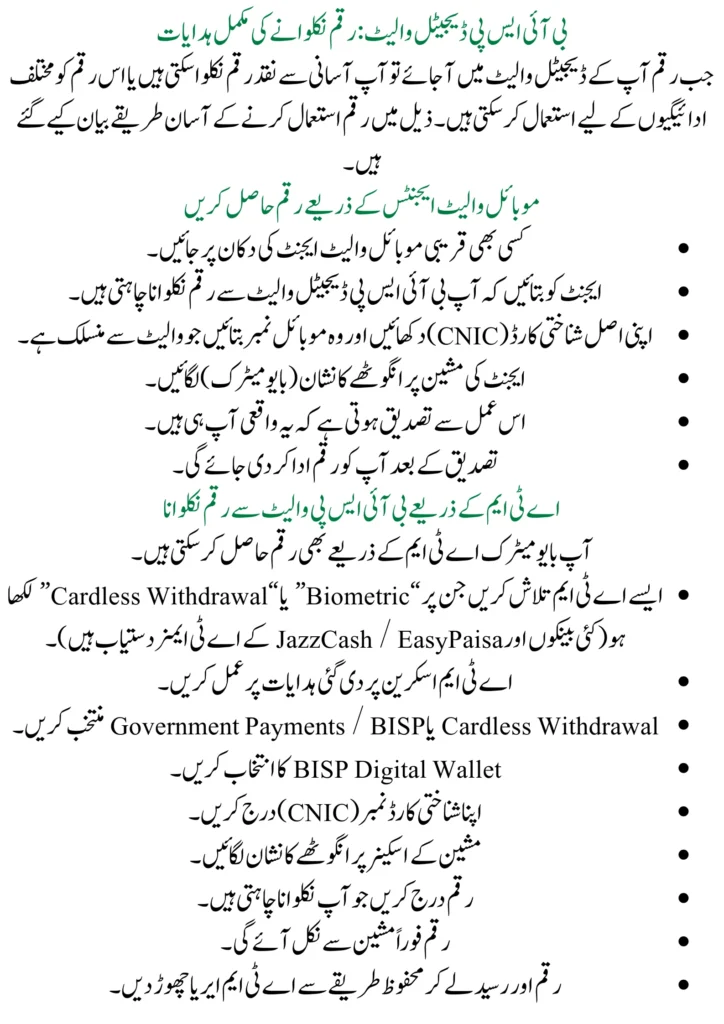
Access Your Funds Through Mobile Wallet Agents
- Go to any agent shop.
- Tell the agent you want to withdraw from your BISP Digital Wallet.
- Show your original CNIC and give your mobile number that is linked to the wallet.
- Do a thumbprint scan on the agent’s machine.
- This confirms it is really you.
- Then you can receive your payment.
Access Your BISP Wallet Cash via ATM
You can also withdraw cash from special biometric ATMs. Find a biometric ATM Look for ATMs with “Biometric” or “Cardless Withdrawal” options. Many banks and JazzCash/EasyPaisa ATMs.
- Follow the machine steps at the ATM screen.
- Choose “Cardless Withdrawal” or “Government Payments / BISP”.
- Select “BISP Digital Wallet”.
- Enter your CNIC number.
- Do a thumbprint scan on the machine’s scanner.
- Enter the amount you want to withdraw.
- Collect cash safely, the cash comes out instantly. Take your money and receipt, and leave the ATM area safely.
Using Funds for Bills and Transfers
You can use this payment for the utility bills, electricity bill, to recharge your mobiles, and transfer money to another person. For this use follow these steps:
To pay the Utility Bill
- To pay Utility bill payments, open the JazzCash or EasyPaisa app.
- Go to Bill Payments.
- Choose the bill type.
- Enter your consumer number.
- Pay from your BISP wallet balance.
- No extra fees for utility bills.
Mobile recharge
- Select Mobile Recharge
- Choose your number or any other
- Enter amount
- Pay from the wallet. Very useful for keeping your phone active.
Money transfer to another
- Go to Send Money or Transfer.
- Enter the receiver’s mobile number.
- Send any amount from your wallet balance.
- It’s fast, safe, and free or has a very low fee for small amounts.
Key Features and Benefits of the BISP Wallet System
The BISP Digital Wallet linked with your SIM brings huge improvements over the old cash distribution system. It gives you more control, safety, and convenience, especially for women in low-income families
BISP Wallet: Fast Payments, Less Waiting
No more waiting days or weeks for cash to arrive. Payments come directly to your phone wallet instantly when released. You check balance, withdraw, or spend in minutes; no travel or long waits.
Protecting Your Funds with BISP Digital Wallet
Money goes straight to your wallet linked to your CNIC and SIM. Only you can access it with your thumbprint or PIN. No risk of middlemen taking a cut, losing money, or fake people claiming your payment.
Skip Long Lines with BISP Digital Wallet
Forget standing in long lines at banks or payment points for hours in hot weather. With the wallet, you get paid at home. No queues, no crowds, no stress.
Conclusion:
By using the BISP Digital Wallet, you are taking full control of your Benazir Kafalat payments. If not, visit a Jazz or EasyPaisa franchise and transfer it. Get a free BISP SIM at your local BISP Tehsil Office or camp. They register it on the spot. Activate your wallet go to a BISP office or authorized center with your original CNIC. Do biometric thumb verification. You’ll get a confirmation SMS and a PIN for security. Download the JazzCash or EasyPaisa app to see your balance. Nearby JazzCash/EasyPaisa agents. Biometric ATMs. Or use the money directly for bills, mobile recharge, groceries, or send it to family.
FAQ’s
What is the method of a digital wallet?
Go to a BISP Tehsil Office or SIM camp. Show CNIC. Do a biometric thumbprint. Get/link SIM. Wallet activates instantly. You get a confirmation SMS.
Can I receive payments on any SIM?
No, the SIM must be registered in your name and linked to your CNIC. If you don’t have one, BISP provides a free SIM on the spot.
What is the purpose of the BISP Digital Wallet?
It is a mobile account linked to your CNIC and SIM. You can get your BISP payments directly on your phone without relying on anyone else.
Can I use any SIM for payments?
No. The SIM must be registered in your name and linked to your CNIC. If you don’t have one, BISP will give you a free SIM.