

BISP December Digital Wallet Payments 2025: Complete Guide
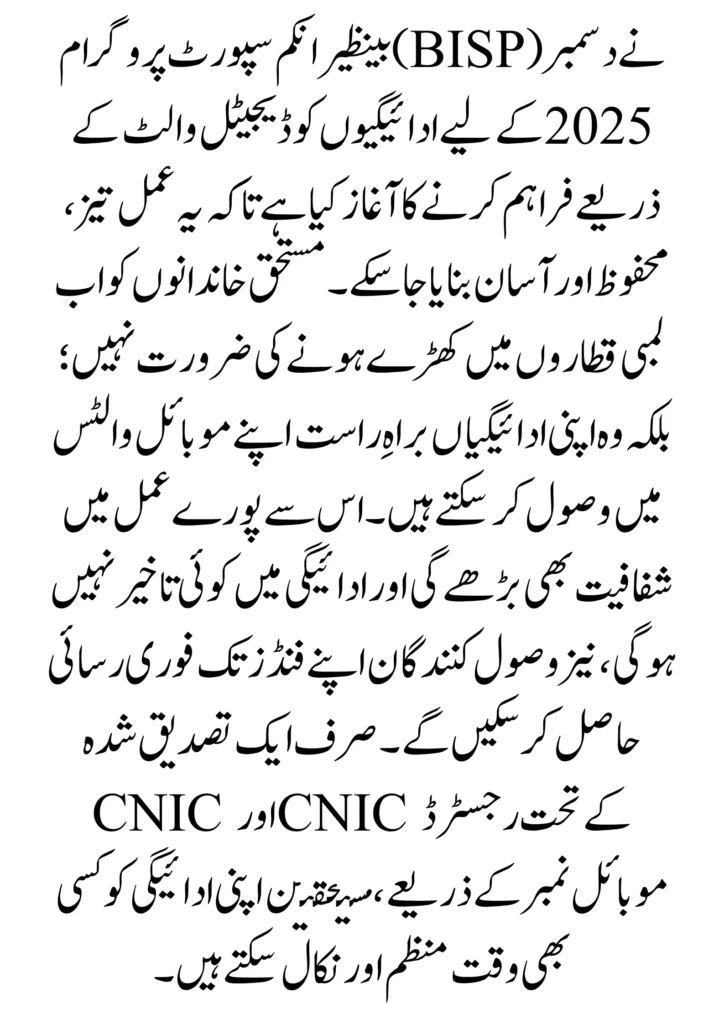
The Benazir Income Support Programme (BISP) has implemented disbursement through the digital wallet as a quick, secure, and easy disbursement option for December 2025. The eligible families do not have to stand in long queues anymore; rather, they can receive their payments directly into their mobile wallets. It is going to add an extra layer of transparency to the whole process and also ensure that there is no delay, and recipients will have instant access to their funds. With just a verified CNIC and a mobile number registered under the CNIC, beneficiaries would be able to manage and withdraw the payment anytime.
Read More: Benazir Income Support Programme Introduces Social Protection Wallet 2025
What Are BISP Digital Wallet Payments?
- The new method introduced by BISP Digital Wallet Payments is sending financial help directly into the mobile wallet accounts of beneficiaries instead of going to any cash center or ATM. These digital wallets may be JazzCash, Easypaisa, UPaisa, or more, as approved by BISP, through which the beneficiary will receive funds and be able to keep and withdraw money securely using a mobile phone.
- It makes paying easy by reducing long lines, eliminating hidden fees, and providing a quick way for people to get their cash. With a face check and a listed phone number, users can get their BISP pay digitally and use it when they want.
Eligibility for Receiving BISP Payments in Digital Wallets
1. Must Be a Registered BISP Beneficiary:
Only those women who were already officially enrolled in the Benazir Kafalat Program can shift to the digital wallet payment method. New applicants will first have to complete registration and be declared eligible either through 8171 or a Tehsil Office.
2. Valid CNIC of the Beneficiary:
The beneficiary should have an active and valid CNIC, and NADRA should issue it. Expired, blocked, or incorrect information regarding the CNIC must be updated before wallet payments are activated.
3. Mobile Number Registered under CNIC:
The mobile number must be owned by the beneficiary herself. Digital wallets shall operate only if the SIM is registered under the CNIC of the beneficiary. No payments shall be received if it is someone else’s SIM (husband, son, or relative). If the number is not correct in the record, she should get it updated. The place to update it will be at the BISP Tehsil Office.
4. Biometric verification required:
Since biometric verification (thumb impression) is required for linking the CNIC with a digital wallet, it may be done at the BISP Tehsil Office or at any Wallet service provider (JazzCash / Easypaisa) retailer.
5. Must Use a BISP-Approved Digital Wallet:
Beneficiaries can receive payments in any mobile-wallet approved by BISP, JazzCash, Easypaisa, UPaisa, and NayaPay (if enabled by BISP). Only approved wallets will be able to receive the December 2025 digital payments.
6. No Previous Fraud or Payment Block:
All those beneficiaries whose payments were blocked due to verification issues or suspected fraud will first clear their case from the Tehsil Office before shifting to digital wallets.
How to Register for BISP Digital Wallet Payments
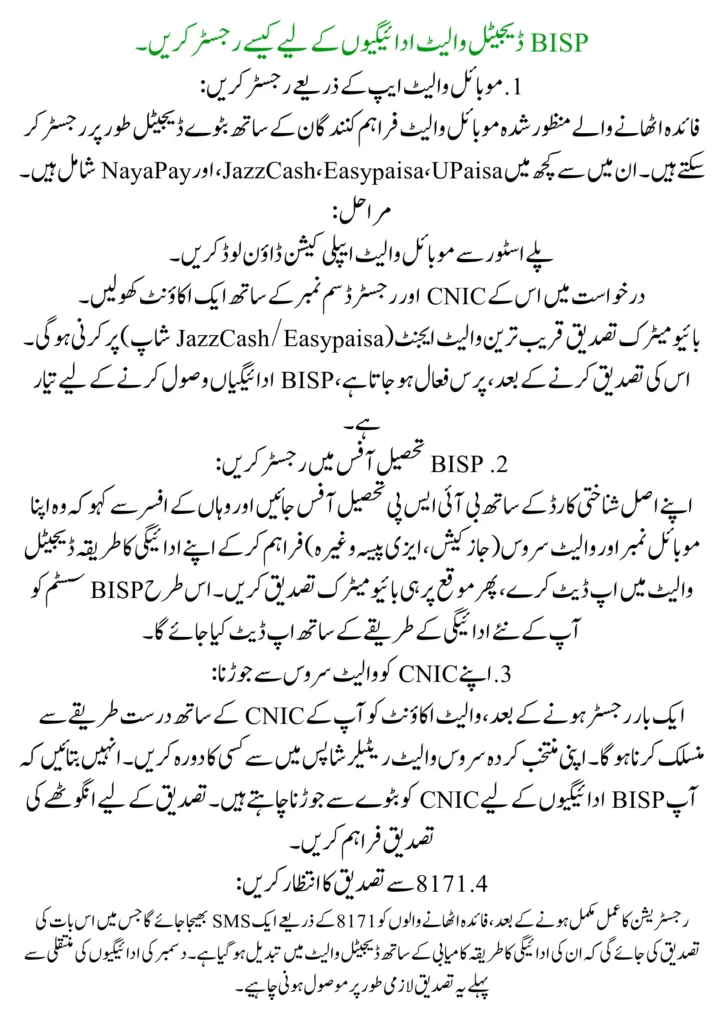
1. Register through a Mobile Wallet App:
Beneficiaries may register wallets digitally with approved mobile wallet providers. Some of these include JazzCash, Easypaisa, UPaisa, and NayaPay.
Steps:
- Download the mobile wallet application from the Play Store.
- Open an account in the application with her CNIC and registered SIM number.
- Biometric verification has to be done at the nearest wallet agent (JazzCash/Easypaisa shop).
- After you verify it, the wallet turns active, ready for receiving BISP payments.
2. Register at a BISP Tehsil Office:
Go to the BISP Tehsil Office with your original CNIC and tell the officer there to update your payment method to a digital wallet by providing your mobile number and wallet service (JazzCash, Easypaisa, etc.), then do biometric verification on the spot. This is how the BISP system will be updated with your new payment method.
3. Linking Your CNIC With the Wallet Service:
Once registered, the wallet account has to be associated with your CNIC accurately. Perform a visit to any of your chosen service wallet retailer shops. Tell them you want to link the CNIC with the wallet for BISP payments. Provide thumb verification for confirmation
4. Wait for Confirmation from 8171:
After the registration process has been completed, an SMS will be sent to beneficiaries by 8171 confirming that their payment method has successfully been switched to a digital wallet. This confirmation must be received before the December payments are transferred.
How to Receive December 2025 BISP Payments in Digital Wallets
1. SMS from 8171͏:
After the reply of 8171, an official will send you an installment, and your December 2025 installment has been transferred to your registered digital wallet. If no such type of message is received, then dialing 8171 or visiting any Tehsil Office can determine the status.
2. Check Wallet Balance͏:
After receiving that message, just open your mobile wallet, whether it is JazzCash, Easypaisa, UPaisa, or any other.
- Sign in with your phone number.
- Go to Balance Inquiry or Home Screen to see the updated balance.
- The BISP payment amount will show up by itself.
- Those getting help who use button phones can dial the USSD code of their wallet to check the balance.
3. Payment Automatically Deposited:
No manual claiming or requesting is required. As soon as BISP releases the installment, the amount will be auto-credited to your wallet that is linked with your CNIC and verified SIM, hence eliminating delays, long queues, and unnecessary visits to payment centers.
4. Cash Withdrawal Options:
Beneficiaries will be able to cash out their BISP amount through the following options:
-
Agent/Retailer Wallet (Biometric Needed)
Visit any retailer of JazzCash/Easypaisa/UPaisa and present the following: your CNIC number, Registered mobile number, and Biometric thumb verification. Funds will be handed over in cash immediately.
-
ATM Withdrawal (Where Applicable)
Certain wallets support cash withdrawal at partner ATMs. Beneficiaries may use a mobile number, CNIC, or PIN to withdraw funds.
5. Transfer to Bank Account
If the beneficiary has a bank account, payment may be deposited into the bank via the wallet.
6. Save Transaction Receipts or SMS:
After withdrawing cash, always keep the SMS or receipt as proof of payment. This helps in case of disputes or missing payment records.
Benefits of Using Digital Wallets for BISP Payments
1. No More Long Queues or Waiting:
No more long queues or waiting because there will be no need to visit payment camps or crowded centers. Instant receipt of payment in their mobile wallets, all beneficiaries will not be bound to stand in a long thirty-minute line.
2. Faster and Instant Payment Transfer:
Faster and instant payment transfer because as soon as BISP releases the installment, the payment gets automatically deposited in the beneficiary’s wallet. Delays are reduced, and access to funds is made quicker.
3. Safe and Transparent Transactions:
An SMS will accompany each payment and reflect in the transaction history of the wallet. This promotes transparency as beneficiaries get to track their money, thereby reducing the chances of confusion or fraud.
4. 24/7 Access to Funds:
Beneficiaries may check the balance, withdraw cash, or transfer funds at any time; there is no restriction on office timings or bank hours.
5. Reduced Chances of Fraud:
Fraud or unauthorized deductions become impossible. Digital wallets free the beneficiaries from the clutches of middlemen and payment agents taking unauthorized fees. Biometric verification ensures that only the rightful beneficiary withdraws the money.
6. Multiple Withdrawal Options:
With wallets, beneficiaries may withdraw from wallet agents and banks, as well as use their wallets for mobile top-up or any bills that need to be paid. This flexibility makes digital payments easier and more efficient.
7. Convenient for Remote Areas:
Women residing in remote areas do not have to travel long distances to payment centers since a wallet agent is just nearby, available in almost every village and town.
Read More: BISP Digital Wallet System for Beneficiaries in Rural Areas: Secure Withdrawal Full Guide 2025
Important Tips for Beneficiaries
- Cell phone to keep the SIM active and in your name to be registered under your CNIC.
- Use BISP-allowed digital wallets-preferably JazzCash, Easypaisa, UPaisa, NayaPay.
- Complete the biometric process to avoid issues in withdrawal.
- Update CNIC or mobile number, when applicable, before the payment month.
- Recheck the wallet balance after any payment is made.
- Keep a copy of SMS or transaction slips with you for the record.
- Never share your wallet PIN or OTP with anyone.
- Only withdraw money from authorized agents or ATMs.
- If you run into any issues with payment, try reaching out to the Tehsil Office or give 8171 a call.
Conclusion
BISP digital wallet payments shall provide access to the beneficiaries as an easy, safe, and fast channel for receiving financial assistance in December 2025. They just have to use approved mobile wallets like JazzCash, Easypaisa, UPaisa, or NayaPay, and their funds will be deposited with immediate access- no need to go through crowded payment centers. Proper registration followed by biometric verification and safety tips shall make the payment experience seamless. Through digital wallets, BISP not only brings transparency and efficiency but also brings empowerment to the beneficiaries by giving them more control over their financial assistance.
FAQs
Can I switch from ATM to a digital wallet for BISP payments?
You can update your payment method at the BISP Tehsil Office with an approved digital wallet agent.
How long does it take for the BISP payment to appear in the wallet?
Payments go through almost immediately after release, most of the time. In case of a delay, it may take 24-48 hours.
Which digital wallets are approved by BISP?
JazzCash, Easypaisa, UPaisa, and NayaPay (if enabled by BISP) are acceptable for payment reception.
What should I do if my payment doesn’t arrive in the wallet?
Check CNIC and mobile number at the Tehsil Office or with the wallet agent. For help, you can also dial 8171.