
Rechecking 8171 Eligibility: What to Do If You Were Declared Ineligible
The 8171 web portal enables individuals to confirm if they are entitled to benefit from the BISP and Ehsaas programs. However, there are instances where many applicants are tagged as ineligible due to data mismatches or incomplete verification. If you find yourself as one of the ‘’Ineligible’’ candidates, do not panic. There is a way you could recheck and update your information to become eligible once again. Find out how to reverify your status and your eligibility.
Read More: Recheck Your 8171 Web Portal Eligibility 2025 — Complete Step-by-Step Guide
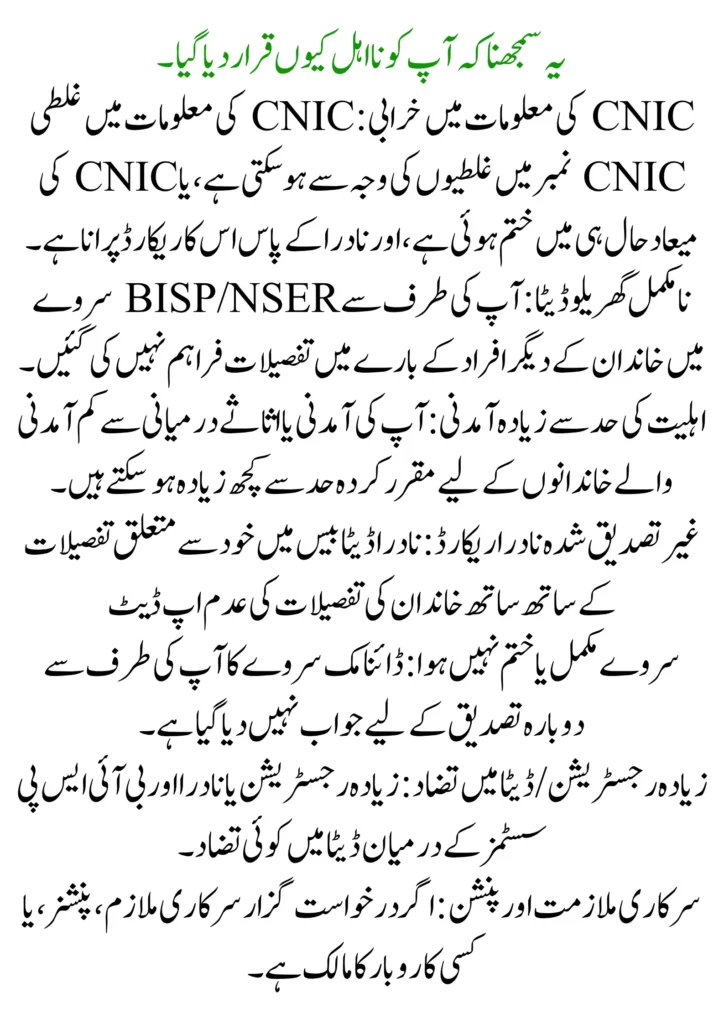
Understanding Why You Were Declared Ineligible
- CNIC information error: CNIC information error can take place due to Mistakes in the CNIC number, or the CNIC has expired recently, and NADRA has its records outdated.
- Incomplete Household Data: Details not provided by you regarding other family members in the BISP/NSER survey.
- Income Beyond Eligibility Limit: Your income or assets may just be above the limit set for middle- to low-income families.
- Unverified NADRA Record: Non-updation of particulars related to himself/herself, as well as family particulars in the NADRA database
- Survey Not Completed or Expired: The Dynamic Survey has not been responded to by you for re-verification.
- Over Registrations / Data Discrepancy: Over registrations or any data discrepancy between the NADRA and BISP systems.
- Govt Employment & Pension: If the applicant is a govt employee, pensioner, or owns any business.
How to Recheck Your 8171 Eligibility Online
If you were marked ineligible, you can easily recheck your status from the official web portal at 8171.
- Visit 8171.bisp.gov.pk and write your CNIC number (13 digits) in the box.
- Write the captcha code as it is. Click on submit.
- The system will quickly display your latest eligibility status. It’ll let you know if you’re eligible, ineligible.
If you are not an Internet user so you can Check Through SMS by sending your CNIC Number (Without Dashes) to 8171. In return, the eligible status results in which message being displayed to you. First of all, ensure that your CNIC details are updated in NADRA before rechecking; outdated details always knock out the case of eligibility.
Read More: Recheck Your 8171 Web Portal Eligibility 2025 — Complete Step-by-Step Guide
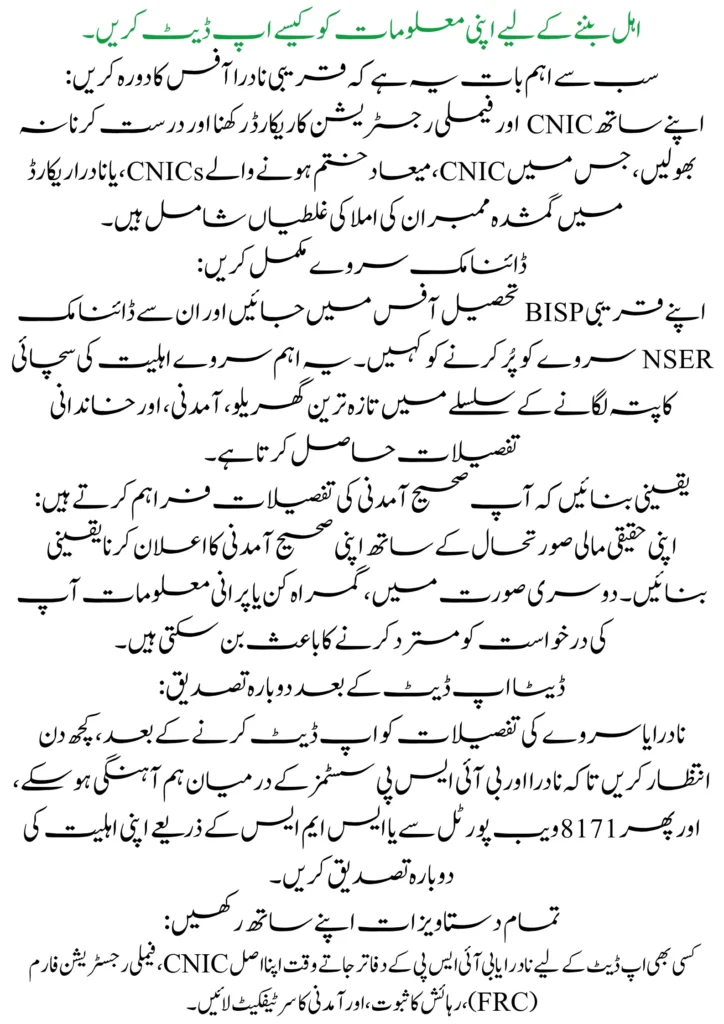
How to Update Your Information to Become Eligible
-
Most importantly, visit the nearest NADRA Office:
Don’t forget to carry and correct CNIC and family registration records with you, which include any spelling mistakes in the CNIC, expired CNICs, or missing members in the NADRA record.
-
Complete the Dynamic Survey:
Visit your nearest BISP Tehsil Office and ask them to fill in the Dynamic NSER Survey. This important survey captures updated household, income, and family particulars in relation to ascertaining the truth of the eligibility.
-
Make sure you provide the right income details:
Make sure to declare your rightful income with your true financial situation; otherwise, misleading or out-of-date information may lead to your application’s rejection.
-
Reverification After Data Update:
After updating NADRA or survey details, wait for some days so that the synchronization between NADRA and BISP systems can take place, and then re-verify your eligibility from the 8171 web portal or through SMS.
-
Have All Documents with you:
Bring your original CNIC, Family Registration Form (FRC), proof of residence, and income certificate while visiting NADRA or BISP offices for any updates.
Rechecking Eligibility After Data Update
After you have corrected or updated the information with NADRA or BISP, it may take a few days for your records to synchronize in the 8171 system. Once the update is complete, you can recheck your eligibility through the same above-mentioned process.
- Log on to the official site at 8171.bisp.gov.pk.
- Fill in your 13-digit CNIC number along with the Captcha code.
- Press “Submit” to view your new eligibility status.
- If it still reflects as “Ineligible” or “Under Verification,” wait for a few more days or visit the nearest BISP Tehsil Office to ascertain the reason.
Visiting the BISP Tehsil Office for Manual Verification
If your status remains ‘Ineligible’ or ‘Under Verification’ during the update, please proceed to the nearest BISP Tehsil Office for manual verification. These instructions will review your details and advise you on how to reclaim your status.
Follow these steps during the visit:
- Remember to take along with you all the required documents: CNIC original, FRC(Family Registration Certificate), income proof, and household information.
- Request Recertification: Request information about your disqualification and recertification under the 8171 program.
- Fill in or update the Survey: Complete a Dynamic NSER Survey if necessary so that all data coincides with your NADRA record.
- Scrutiny of Family and Income Details: Your family size, income level, and the condition of the household may be inquired into by the staff before sanction.
- Receipt of the Confirmation Slip: A confirmation slip is to be asked for after filling in the form or any other tracking number for future use.
Common Mistakes to Avoid During Rechecking
- Typing Wrong CNIC Number: Enter the 13-digit CNIC number once again to be sure it’s your correct CNIC before sending it, either via the portal or through SMS.
- Ignoring Data Updating: Forgetting to renew NADRA or Dynamic Survey data after updating family or income information results in a continued state of ineligibility.
- Using Another’s SIM for SMS: The 8171 SMS service works correctly only if sent from a SIM registered under your own CNIC.
- Failing to Skip the Dynamic Survey: In case you don’t go through the NSER Dynamic Survey, your eligibility will not be verified by BISP.
- Ignoring Important SMS Alerts: Meanwhile, some applicants ignore or delete official messages from 8171 without knowing that this might be an update or payment message.
- Submission of Incomplete Documents: Try to avoid unnecessary visits and, in case you have to visit, along with CNIC, FRC, and proof of income, please make sure they are original.
Conclusion
Getting a response as ineligible on the 8171 web portal does not amount to permanent disqualification. Majorly, unfitness arises due to wrong or obsolete information that can readily be updated through NADRA or verified by BISP. Directing you in the correct process to update your records, conduct the dynamic survey, and recheck your status, you will be made re-eligible for BISP or Ehsaas financial assistance. Keep your personal data correct always and continue receiving the real benefits you qualify for by having the official 8171 updates.
FAQs
How can I recheck my eligibility after being declared ineligible?
Visit the official portal 8171.bisp.gov.pk or confirm through SMS by sending your CNIC number to 8171. The status will appear after the update.
How long does it take for eligibility to update after correcting my information?
Generally, it takes NADRA and BISP’s records about 7-15 working days to synchronize after the update of your data. You may recheck your status once this period has elapsed.
What should I do if I’m still ineligible after updating my information?
In case you remain ineligible, please take all necessary documents to your nearest BISP Tehsil Office and ask for a manual re-verification of your data.